
How to Edit this Website: Starting to Use WordPress
The WordPress Administrative Dashboard Page
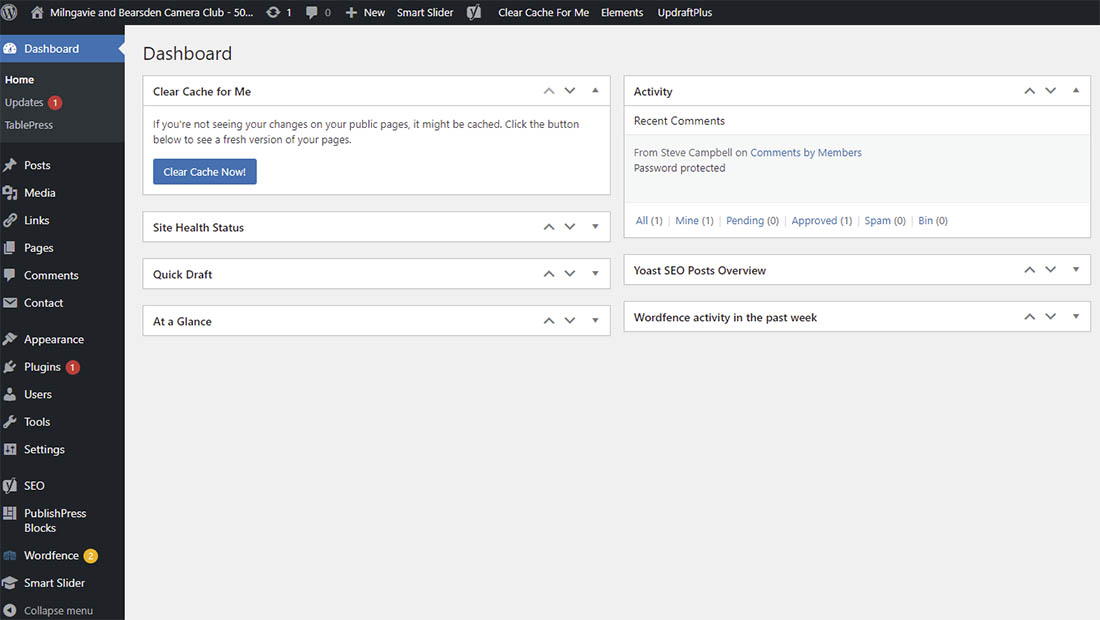
Users with administrative rights can see the WordPress dashboard, which is the page with access to all of the menus for control and creation of the website. The menus (as shown below) have been partially customised by the plugins that have been installed. Hover the mouse over the Club name top left and select Dashboard from the dropdown menu.

Creating a New Page or User is Easy
To create a new page, for example, the website editor simply has to hover the mouse over ‘New’ in the top menu and select page from the dropdown choice. To create a new user select ‘User’ from the same list of options and just fill in the form.
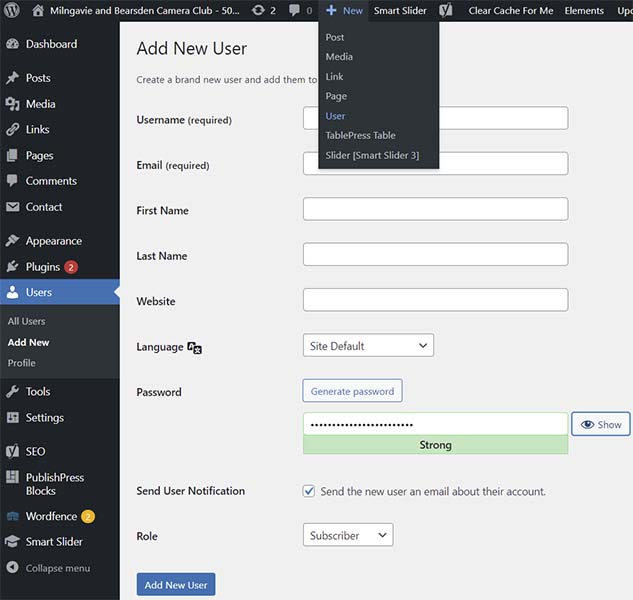
Remember not to give new members an admin or editorial role if they just need access to the members area. It probably helps to send them a temporary strong password and ask them to change it.
Short Introductory Videos About the Dashboard
WordPress Theme
A WordPress Theme (or template) is an essential part of a WordPress website. The theme allows you to control the look of the website. We use the GeneratePress Premium Theme which needs to be renewed on an annual basis. Use of this the is presently restricted to additional attributes added to the Site Customisation menu. The ‘Elements’ component is not presently in use on this site.
WordPress Plugins
WordPress plugins are essential addons that expand its functionality in many important ways. It is best to only use plugins that are listed in the Word press plugin directory. Plugins can be sources of security weaknesses which can be exploited by hackers. Only use those which are necessary and are well maintained to cope with updates to WordPress and PHP and security issues.
We have 2 paid-for plugins:
- The GeneratePress Theme plugin that unlocks the premium features
- The Filebird plugin to organise the media library.
(explained on another page)
Learning to Use WordPress
The combination of WordPress, the chosen theme, and the plugins give you the ability to add new pages, modify them, add slideshows and images galleries. Although a new page can be created with one mouse click, there is a learning curve in developing and maintaining a WordPress website.
WordPress.org is the official website of WordPress. (WordPress.com provides paid for WordPress website hosting.) The official WordPress learning material is provided at https://wordpress.org/support/.
WPbeginner is a very useful website for learners of WordPress. The WPBeginner YouTube Channel also offers a wide range of materials.
PLEASE NOTE: This website consists of pages rather than (blog) posts. Most of these pages are simple one column pages that do not contain rows.
Enabling Website Searching On The GeneratePress Theme
The search function shown as a magnifying glass icon in the navigation bar (menu) has been switched on using the Dashboard > Appearance Customize > Primary Navigation >Navigation Search and select Enable
The use of the theme has been customised to completely hide the content of member-only pages. This was done in a very crude way by only returning the titles of pages in the search results. This step was done by adding additional CSS in the theme customisation; Dashboard> Appearance > Customize > Additional CSS.
body.search .entry-summary, body.search .entry-content {
display: none;
}