
How to edit This Website: The Plugins Currently in Use
‘Core’ Plugins Added to This site
GeneratePress Premium plugin provides the enhanced premium features of the free Generate Press Theme. This is said to be a lightweight theme that allows fast page download. It allows website design to be altered by adding menu choices to the Dashboard WordPress customisation section.
Wordfence Security (free version, 30 days out of date). This plugin provides a firewall and gives some protection against hackers.
Updraft Plus is a plugin that provides a way to back to backup WordPress from within WordPress rather than through the hosting account. It provides a very important secondary backup process. We use the free version.
Presently this secondary backup is sent to the club website editor’s personal Google Drive.
Wicked Folders is a free plugin that that allows virtual filing of pages into folders and subfolders. Very conveniently it uses a drag and drop interface. Note that the pages are not actually moved into different operating system folders. This means that the page URL are not changed and page links are not changed. https://wickedplugins.com/
FileBird is used or organise the Media library of WordPress into virtual folders. Without this plugin the Media Library Page, available through the dashboard is just one enormous list of images displayed as a gallery. Note that images are not being moved into different operating system folders so this plugin does not disrupt the functioning of the website.
This plugin is purchased here.
User Menus
The User Menus plugin extends the menu options so that particular menu entries can be restricted to logged in users depending on their role. Note however that does not make these pages private. Each menu item that is to be restricted to members needs to have the appropriate options selected. The User Menus plugin page at wordpress.org shows good screen shots of how this is done.
Content Control
The Content Control plugin is a very useful free plugin that allows us to restrict pages to logged in users only. It can also be used to restrict part of pages that are publically available using control codes ([control-content] then some logged in content [/control-content]) and the shortcode editing block. Useful example of the control codes can be seen in the in the screen shot images on the plugin repository page of WordPress.org.
WP Sitemaps Config
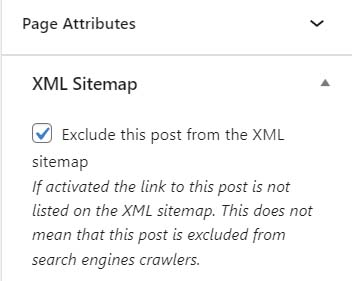
Sitemaps are used by search engines robots such as Google. This plugin controls what sitemaps are produced at https://www.mbcc.org.uk/wp-sitemap.xml via the main Dashboard Settings. In addition individual pages can be excluded from site maps via the page options within the page editor. Practice pages for example could be excluded.
Duplicate Page is a very simple but useful plugin that duplicates a page. Just press the button on the page controls area on the right whilst editing. Or when viewing page just hover over the new page tab in the menu at the top of the page and choose Duplicate page from the dropdown. Alternatively hover over a page listing in the ‘All pages’ menus choice on the Dashboard page and when the little menu appears select Duplicate.
Disable Search
This Plugin disables the search function in an attempt to hide any member-only page contents that might appear in a search. Presently it is deactivated.
Akismet Anti Spam is designed to reduce spam generated through having a contact form at the bottom of the About page. For more details see https://akismet.com/